The audio task
Setting a compressor's threshold, ratio, attack, and release by ear is a skill built over years, and even an experienced engineer can lose time auditioning settings on an unfamiliar source. A producer working quickly, or one who has not yet built compression instincts, needs a way to explore plausible settings without guesswork, and without losing the ability to change any parameter by hand afterward.
What the documents show
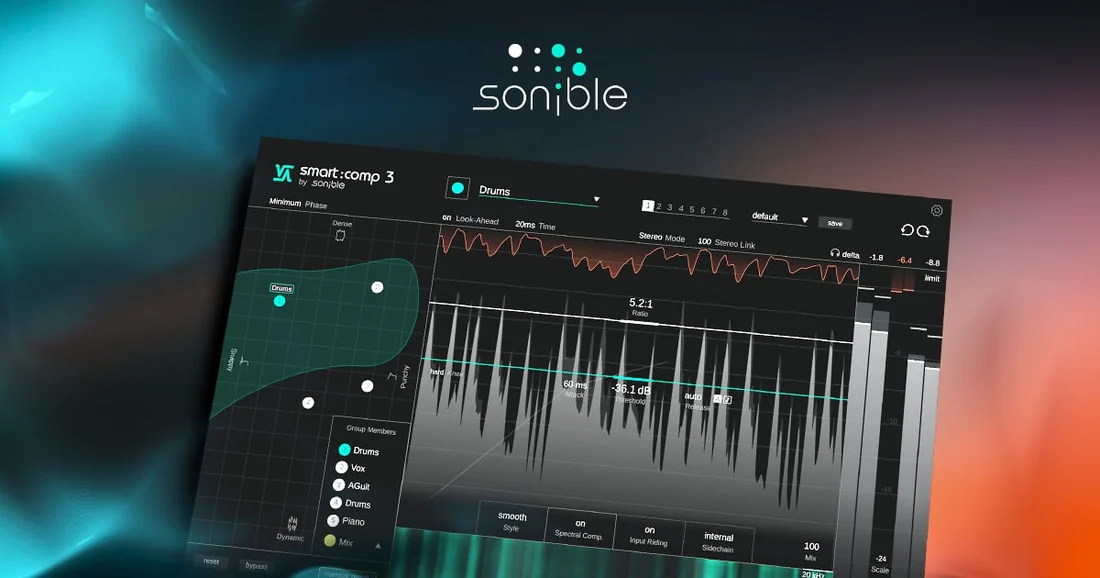
Austrian plugin maker sonible's product page for smart:comp 3 describes a “Compression Matrix” that uses “AI-powered analysis and automatic parametrization” to “map an entire spectrum of musically viable compression settings based on the characteristics of your audio material.” The page frames this as letting a user “explore your track's potential without the usual trial and error,” language that positions the plugin as a generator of starting points rather than a system that finalizes a mix decision. The same page lists retained manual control: standard compression controls, an advanced tab with further tweakable parameters, and a custom mode offering control over attack and release shaping. sonible does not publish the model or dataset behind the analysis, and the page does not claim the tool identifies one correct setting; it presents a range to audition and pick from.
Rights status
smart:comp raises a software-licensing question rather than a content-rights one. The product's own specifications describe authorization as either machine-based or iLok, determining whether the licence is tied to one computer or a portable dongle a studio can move between machines. The listed model is a one-time purchase, not a subscription. Nothing on the page addresses ownership of audio processed through the plugin, because compressing a signal a producer already controls does not change who holds rights to the underlying recording.
What to check before you use it
This is an editorial checklist. Before adopting smart:comp into a paid session, confirm whether the licence purchased is machine-locked or iLok-based, since moving a project between a studio computer and a laptop may require the portable option; verify that authorization does not lapse if a machine is replaced; and treat the Compression Matrix's suggested settings as a starting range to audition against reference material rather than a substitute for listening on the monitors a mix will be judged on.
- Does this session need the plugin's authorization to travel between machines, and does the purchased licence support that?
- Have the AI-suggested settings been checked against a reference track on the monitoring the client will use?
- What does sonible's documentation say a user should do when the source material changes significantly mid-session?
smart:comp is a clear example of a mixing tool built around what its maker, sonible, calls assistance: a system that narrows a large parameter space to a manageable set of options while leaving the final decision, and every control, in the user's hands. The distinction sonible draws between generating options and making the call is worth preserving whenever a plugin's marketing uses the word AI for what is, on the vendor's own account, a decision-support feature.
Sources & reading trail
Describes the Compression Matrix's AI-powered analysis, retained manual controls, and the plugin's machine-based or iLok authorization.
Source published: Not established · Retrieved: 16 September 2026
Confirms smart:comp is part of sonible's smart: series of mixing tools.
Source published: Not established · Retrieved: 16 September 2026
Documentation, licences and platform policies establish the note; the what-to-check reading is Music Tech Field Notes editorial analysis. This retrospective draft does not imply the site published on the event date.